
Website quality
A good modern website should be fast, good-looking and easy to use.
Everyone says so, and nobody disagrees. But are there firm criteria — verifiable ones — that let you say with confidence that one site is better than another?
Let us agree up front on what “firm” means. A firm criterion is one that:
- rests on real figures from research and statistics, or on the text of a standard;
- lets you check your own site with tools that are public and widely accepted.
1. Speed
53% of visits are abandoned if a page takes longer than 3 seconds to load.
46% of people say waiting for pages to load is what they dislike most about browsing on a phone.
Sites that load in 5 seconds earn twice as much from advertising as sites that load in 19.
The research puts the critical threshold at 3 seconds. Under 2 seconds is the comfortable range — what most people quietly expect.
There is more on this in our article “Website speed”.
Getting pages to load quickly is something to plan for at the very start of building a site, because a great many different factors feed into it.
The thing to keep in mind is simply this: a slow site works for you at half strength.
- Check your site’s speed: PageSpeed Insights by Google
2. Working on a phone
A responsive site is one that adjusts itself automatically to the size of the visitor's screen.
Plenty of people assume a site should look good on the desktop first — on a monitor or a laptop. And there is something to that: a big screen gives you room for an elaborate composition, rich graphics, a lot of blocks of information. On a phone the same site turns into something much plainer — text and pictures in a single column, a lonely three-line menu button at the top.
That is all true. A mobile layout will lose to a wide desktop one on sheer impression.
But look at the charts:
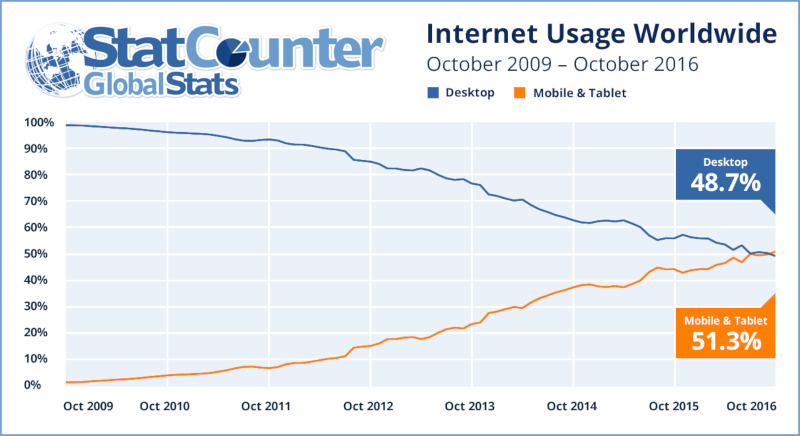
Internet usage on desktop versus mobile devices
Source: StatCounter
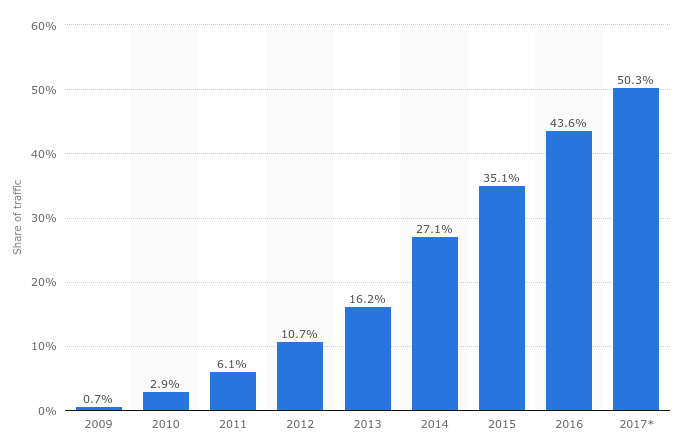
Global share of website traffic coming from mobile phones, 2009 to 2017
Source: Statista
At the end of 2016 the web passed a turning point: more visits began arriving from mobile devices than from desktop computers.
In Ukraine the split is still more conservative — around a third of visits come from phones rather than half. The direction is the same as everywhere else, though. According to the Google Consumer Barometer, as early as 2016, 36% of Ukrainians under 35 looked up product information on a phone as often as on a computer.
An ordinary, non-responsive site can of course still be viewed on a phone. It just comes out tiny and awkward, because a picture drawn for a large screen is being forced into a small one. And however striking that large version looks on a desktop, none of it helps if the visitor has to drag the page around the screen, pinch it in and out, and aim carefully at the links.
If you happen to have competitors, it will be easier for that visitor to go and find a site that works properly. A responsive one.
- Test how well your site works on mobile: Google’s mobile site testing tool
- 25 tips from Google Ukraine on building for mobile (March 2017)
- Mobile Internet — Statistics & Facts
3. Standards compliance
This is the simplest item on the checklist, and the most ambiguous.
The simplest, because nothing could be easier than sending someone to validator.w3.org to paste in a URL and read the result.
The most ambiguous, because reading that result takes judgement — you have to know which findings are problems and which are not.
More than that: in some cases, following the validator's automatically generated advice to the letter will damage your site.
Bootstrap, for instance, uses so-called CSS hacks that keep a site working in older browsers which no longer follow current specifications but are still out there on people’s machines. Those hacks are often formally in breach of the standard. Strip them out and your code becomes impeccable on paper while the site falls apart for anyone on an old browser.
Whatever else, the W3C’s validation tools are the primary means of checking a site against the standards. They are professional instruments. At the very least you can always run your site through them and ask your developers how to read what comes back.
- Check your HTML
- Check your CSS
- Check your links
- Check HTML, CSS and links together
- Check that the encoding and language declarations are right